Today Weather:Data by NOAA/NWS
- 4.6
- Rating
- 1.00M
- Installs
- Free
- Price

 Analysis by App-foxy
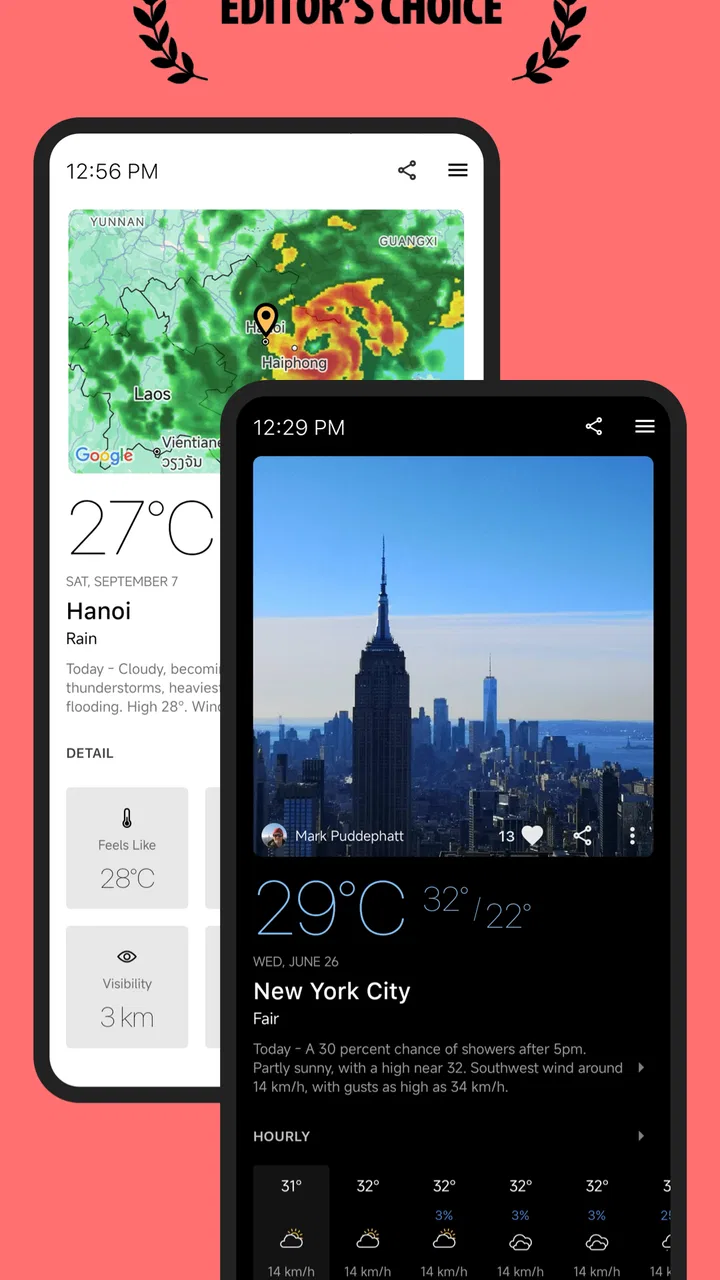
I tend to judge a weather app by what happens when I am already late, carrying groceries, or trying to decide whether a walk is sensible before leaving home. Today Weather:Data by NOAA/NWS makes a strong first impression because it puts practical information ahead of decoration. It is a free weather app from todayweather.co, available for everyone, with optional in-app purchases ranging from $0.99 to $18.99 per item. Its average rating is 4.6 from around 102 thousand ratings, and it has passed one million installs, so it is clearly being used as a regular daily tool rather than an occasional novelty.
After spending time with it, I see the app as a good fit for people who want a focused forecast, customizable widgets, radar, and warnings in one place. Its connection with the U.S. National Weather Service is especially useful when severe weather matters more than a polished visual forecast. At the same time, the experience is not equally comfortable for every user or every situation. Readability, touch accuracy, visual attention, and dependence on current connectivity all influence how helpful it feels.
How clearly the forecast is organized
The first thing I appreciate is that the app is built around the questions people actually ask: What is happening now? What will the next few hours look like? Do I need an umbrella, a jacket, or a different plan? Rather than forcing me through a long sequence of decorative screens, it gives weather information a practical structure. That makes it easier to check quickly before commuting, taking children outside, or planning an errand.
You May Also Like

 Blood Strike: 2.5 Anniversary
Blood Strike’s Loadouts Turn Every Drop Into a Tactical Gamble
A close look at Blood Strike’s custom loadouts: how fast access to signature weapons reshapes its battle royale rhythm, rewards preparation, and narrows the gap between fights.

 Pandora - Music & Podcasts
Pandora’s Music Is Easy to Start, but Harder to Recover
Pandora’s strength is its low-effort path from a seed to a station. Its weak spot is how much confidence it asks you to place in connection, setup, and quiet recovery.

 8 Ball Pool
 Is Built on Rivalries, Rematches, and Routine
A close look at the rivalries, rematches, shared routines, and unanswered safety questions that turn a quick pool match into a persistent mobile community.

 Samsung Music
’s Quiet Strength Is Playing What You Already Own
Its reach comes less from spectacle than from dependable access to a personal library. That simplicity is both the app’s strongest retention engine and its ceiling.

 AccuWeather: Weather Radar
AccuWeather Review: A Quick, Clear Forecast for Everyday Decisions
For everyday plans, the best forecast is the one you can understand quickly. AccuWeather makes rain timing, radar, and local conditions easy to act on, with a few trade-offs.

 Hill Climb Racing
Why Hill Climb Racing Still Turns Crashes Into One More Run
A tiny car, a bumpy hill and one more upgrade: Hill Climb Racing keeps resurfacing because its simple chaos makes every near-miss feel personal.
More From Our News Desk



Readability is one of its most important strengths, although the result depends on the device and the amount of information I choose to display. Forecast apps can become crowded when they show temperature, precipitation, wind, humidity, alerts, and hourly changes together. Today Weather:Data by NOAA/NWS gives me more control through its customizable widgets, which helps move the most important information to the phone’s home screen instead of requiring a full app visit every time.
I find widgets particularly useful for reducing navigation effort. A glance at the home screen can answer whether conditions are changing before I open the detailed forecast. This is helpful for someone with limited attention, a busy routine, or difficulty with repeated tapping. It also creates a practical separation between quick checks and deeper investigation: the widget handles the immediate question, while the app remains available for radar, warnings, and a closer look at the forecast.
The interface is easier to understand when I focus on one task at a time. If I want to know whether rain is approaching, I go to the precipitation or radar information rather than scanning every available detail. If I am concerned about dangerous conditions, warnings deserve priority over ordinary temperature information. This sounds obvious, but it matters because weather apps often make every data point look equally important.
For users who prefer larger text or stronger contrast, the experience will depend partly on the phone’s own display and system settings. I would not describe Today Weather:Data by NOAA/NWS as a replacement for device-level accessibility tools, but its straightforward weather purpose makes those tools more useful than they might be in a visually busy app. Increasing system text, enlarging the display, or using a screen reader can improve comfort, though the success of those adjustments may vary across individual screens and widgets.
Navigation that supports quick decisions
I like that the app can serve two different habits. Someone who checks the weather several times a day can rely on a widget and avoid opening the full interface. Someone who wants context can move into radar and warning details. That flexibility is more valuable than simply adding more forecast panels, because it lets users choose how much information they need.
There is a trade-off, however. Customization can make an app feel more personal, but it also asks the user to spend time deciding what belongs on the screen. A person who finds settings tiring may prefer to accept the default arrangement and use only the core forecast. I would recommend setting up the widget once, placing it where it is easy to reach, and resisting the temptation to display every available detail.
The app’s weather focus also makes it less intimidating than a general-purpose news or emergency app. I can open it with a specific question and leave once I have an answer. That narrow purpose is helpful for users who benefit from predictable routines. It is less ideal for someone who wants extensive lifestyle recommendations, travel planning, or a broad local information feed alongside the forecast.
Motor and sensory considerations in everyday use
Weather checks often happen in imperfect conditions: outdoors in bright light, on a moving bus, while wearing gloves, or with one hand occupied. Today Weather:Data by NOAA/NWS works best when I can give the screen a moment of attention. The widget reduces the number of taps, which is a meaningful advantage for people with limited dexterity or fatigue. It also helps when I am carrying something and only need a quick answer.
Radar is more demanding than a simple forecast. Maps invite panning, zooming, and visual interpretation, so users with tremors, reduced precision, or difficulty distinguishing movement may find this part harder to use. I would treat radar as a useful secondary view rather than the only way to understand rain. When touch control is uncomfortable, the written forecast and warning information may be a better route.
For users with low vision, the main issue is not only text size but information density. A screen can be technically readable and still feel exhausting if too many values compete for attention. I get better results by using the widget for the current condition and opening the detailed view only when I need a specific answer. System magnification can help with small map details, but enlarging a radar view may mean moving around more of the map, which adds its own burden.
Color-based weather displays deserve caution. Radar and warning maps often use color to communicate intensity, and that can be difficult for people with color-vision differences. I would not rely on a color gradient alone when deciding whether conditions are safe. I would also read the accompanying text and warnings, particularly during storms, because a visual map is useful for context but should not be the sole source of an urgent decision.
For people who are sensitive to motion or visual change, animated radar may be less comfortable than a still forecast view. In that situation, checking the written timing of precipitation can be calmer and more accessible than watching a moving map. The app gives me enough different types of weather information to make that substitution practical, which is one of its better inclusive qualities.
Hearing-related access is less central to a weather app than it is to a communication or media product, because the core information is presented visually. That does not make the app automatically accessible to every deaf or hard-of-hearing user, but it does mean the essential weather task does not depend on listening to audio. The more important concern is whether the visual presentation is clear enough at the moment it is needed.
A realistic morning routine
Imagine I am leaving for work with a backpack, a coffee, and a short window before the bus arrives. I can check the widget without opening the app, notice that rain is likely later, and decide whether to carry a coat. If the sky then becomes threatening, I can open the warning or radar view for more context. This workflow is better than starting with a complex map because it keeps the first decision simple and postpones extra detail until it is relevant.
The same routine can help a person with cognitive fatigue. Instead of remembering where every forecast tool is, the user can establish a small sequence: glance at the widget, check warnings, then inspect radar only if needed. I find this kind of predictable workflow more valuable than having a large number of features that are rarely used. It also reduces the chance of missing an important alert while browsing less urgent information.
Situational access: when the app is most useful
The app is at its best when weather affects a concrete decision. I would use it before cycling, gardening, walking a dog, planning an outdoor appointment, or deciding whether to dry clothes outside. The combination of ordinary forecasts, radar, and warnings gives me different levels of detail without requiring a separate weather service for every question.
Its National Weather Service foundation is particularly meaningful for users in the United States who want official warning information rather than only a simplified icon and temperature. During severe weather, the distinction between “rain later” and an actual warning matters. I still believe people should follow local emergency instructions, but having warnings available inside the same app makes the transition from routine checking to risk awareness smoother.
For travel, I would use it as a local condition checker rather than a complete trip planner. It can help me understand the weather at a chosen place, but I would not expect it to replace transportation updates, road reports, accessibility information at a destination, or a dedicated emergency service. That limitation is not a flaw in its central purpose; it is simply a reminder to match the tool to the decision.
People who work outdoors may appreciate the ability to move between a quick widget check and more detailed radar information. A construction worker, delivery driver, caregiver, or landscaper often needs to know not only the current temperature but whether conditions are about to change. The trade-off is that a phone screen can be difficult to read in direct sunlight, and repeated checking may be inconvenient when gloves, rain, or safety equipment are involved.
Users with inconsistent internet access should plan around the app’s connected nature. A forecast tool is most useful when it can refresh current information, and I would not treat a previously viewed screen as a guarantee during fast-changing conditions. Before heading somewhere remote, I would check the forecast in advance and avoid depending on a live radar view as the only source of safety information.
Notifications and warnings can also create a tension between usefulness and interruption. A person who needs prompt awareness of dangerous weather may value them greatly, while someone sensitive to alerts may prefer a quieter setup. I would review the phone’s notification controls and choose a level that supports safety without turning every weather change into a distraction.
Where the experience still creates barriers
The biggest barrier is that weather information is inherently dense. Even a well-organized app can present several changing values at once, and users with attention difficulties may not know which one deserves priority. I find it helpful to decide in advance what I need from the app: current conditions, rain timing, or warnings. Opening it without a question can lead to unnecessary scanning.
Radar is another point where inclusion has limits. It is visually informative, but it is not equally clear to everyone, especially when colors, animation, and map movement are combined. A written explanation can be easier to interpret, yet users may still need to switch between views. That extra step is manageable for me, but it could be frustrating for someone who needs a single, highly simplified presentation.
Widgets save effort, but they can also become too small if configured with too much content. A crowded widget defeats its purpose and may be harder to read than the full app. My practical advice is to choose the smallest set of details that supports the daily decision. For many people, current conditions and the next meaningful change are more useful than a miniature dashboard.
There is also a learning curve around customization. The free app is appealing because the basic entry point costs nothing, but optional purchases can complicate expectations for users who want every available capability without spending more. I would begin with the free experience and decide whether the extra options solve a real problem before buying anything. The listed purchase range runs from $0.99 to $18.99 per item, so it is worth checking the purchase screen carefully rather than assuming every feature is included.
The app is not the right choice for someone who wants a purely text-based, ultra-minimal weather tool with almost no visual interaction. It may also disappoint users seeking a full accessibility-first design with clearly documented support for every assistive technology. In those cases, a simpler alternative or a weather service already known to work well with the user’s screen reader, magnification setup, or preferred contrast settings could be a better fit.
Likewise, people who need highly specialized agricultural, marine, aviation, or professional forecasting may require a dedicated service. Today Weather:Data by NOAA/NWS is most convincing as an everyday weather companion, not as a substitute for specialized operational information. Its strengths are convenience, warnings, radar, and flexible presentation; its boundaries become clearer when the decision involves technical forecasting or formal safety procedures.
My inclusive verdict after regular use
I would recommend Today Weather:Data by NOAA/NWS to anyone who wants a practical weather app that can adapt to both quick glances and more detailed checks. The combination of a home-screen widget, radar, and warnings gives it a useful range. I especially like the way a person can build a low-effort routine around it instead of opening a complicated forecast every time.
From an inclusion perspective, its strongest idea is not a particular visual effect but the option to choose how much interaction a weather check requires. A widget can reduce tapping, written forecasts can reduce dependence on animated maps, and warning information can remain more meaningful than a color-coded screen alone. Those choices support different abilities and contexts without pretending that one interface will suit everyone.
My advice is to configure the app for the way you actually live. Put a restrained widget where it is easy to see, enlarge system text if needed, use written forecast details when radar feels visually demanding, and treat warnings as the priority during dangerous conditions. If color contrast, map movement, or small controls make the experience tiring, do not force yourself to use every feature; the app is more useful when it is narrowed to the views you can read comfortably.
Today Weather:Data by NOAA/NWS was released on March 28, 2017, and it has remained recognizable as a focused weather product from todayweather.co rather than turning into a general-purpose content feed. Its Everyone age rating also makes it suitable as a family weather reference, although younger users should still be guided about interpreting severe-weather warnings responsibly.
In the end, I see it as a capable free choice for everyday planning, especially for users who value official U.S. weather information and want control over what appears at a glance. It is not frictionless for people who struggle with dense visual displays, precise map gestures, or changing conditions without reliable connectivity. Still, when I balance its practical tools against those limitations, I find it easy to recommend to a friend who wants a weather app that supports quick decisions without hiding the important details.
FAQs for Today Weather:Data by NOAA/NWS
01What features does Today Weather: Data by NOAA/NWS offer?
Today Weather provides comprehensive weather information sourced from NOAA/NWS, including current conditions, forecasts, air quality, and UV index. The app features a clean and intuitive design, making it easy to access detailed weather maps, radar, and satellite imagery. Users also benefit from customizable alerts and widgets for quick updates.
02Is Today Weather free to use, or are there in-app purchases?
Today Weather is free to download and use, offering a variety of features at no cost. However, there are in-app purchases available that provide access to premium features, such as an ad-free experience and advanced customization options. These purchases enhance the user experience but are not necessary for basic functionality.
03How accurate is the weather data in Today Weather?
Today Weather sources its data from NOAA/NWS, which is known for its reliability and accuracy. The app provides real-time updates and forecasts based on the latest meteorological research and technology. Users generally find the app’s predictions to be highly accurate, making it a trusted choice for weather information.
04Can I customize notifications in Today Weather?
Yes, Today Weather allows users to customize notifications to suit their preferences. You can set alerts for severe weather conditions, daily forecasts, and specific weather changes. The app’s notification system is flexible, ensuring you receive timely updates without unnecessary alerts.
05Does Today Weather support multiple locations for weather updates?
Today Weather supports tracking and receiving updates for multiple locations. Users can easily add different cities or regions to their list to monitor weather conditions in various places. This feature is particularly useful for travelers or those with family and friends in different areas.
Pros
- User-friendly interface with intuitive design.
- Accurate weather forecasts from reliable sources.
- Customizable notifications for severe weather.
- Detailed hourly and weekly weather updates.
- Supports multiple languages and units.
Cons
- Limited free features
- premium needed for more.
- Ads can be intrusive in the free version.
- Some users report occasional data lag.
- Requires a stable internet connection.
- Battery consumption can be higher than expected.

Today Weather:Data by NOAA/NWS
Gallery